
AI for Marketers: How to Choose the Right AI Tools and Build Your Stack
An AI marketing stack is the connected set of AI marketing tools — organized in layers — that you use to plan, create, run, and measure marketing with AI. The direct answer to «which tools should I buy»: choose them by the job you need done, not by how many exist, because a lean, integrated stack of a few tools beats a pile of overlapping ones.
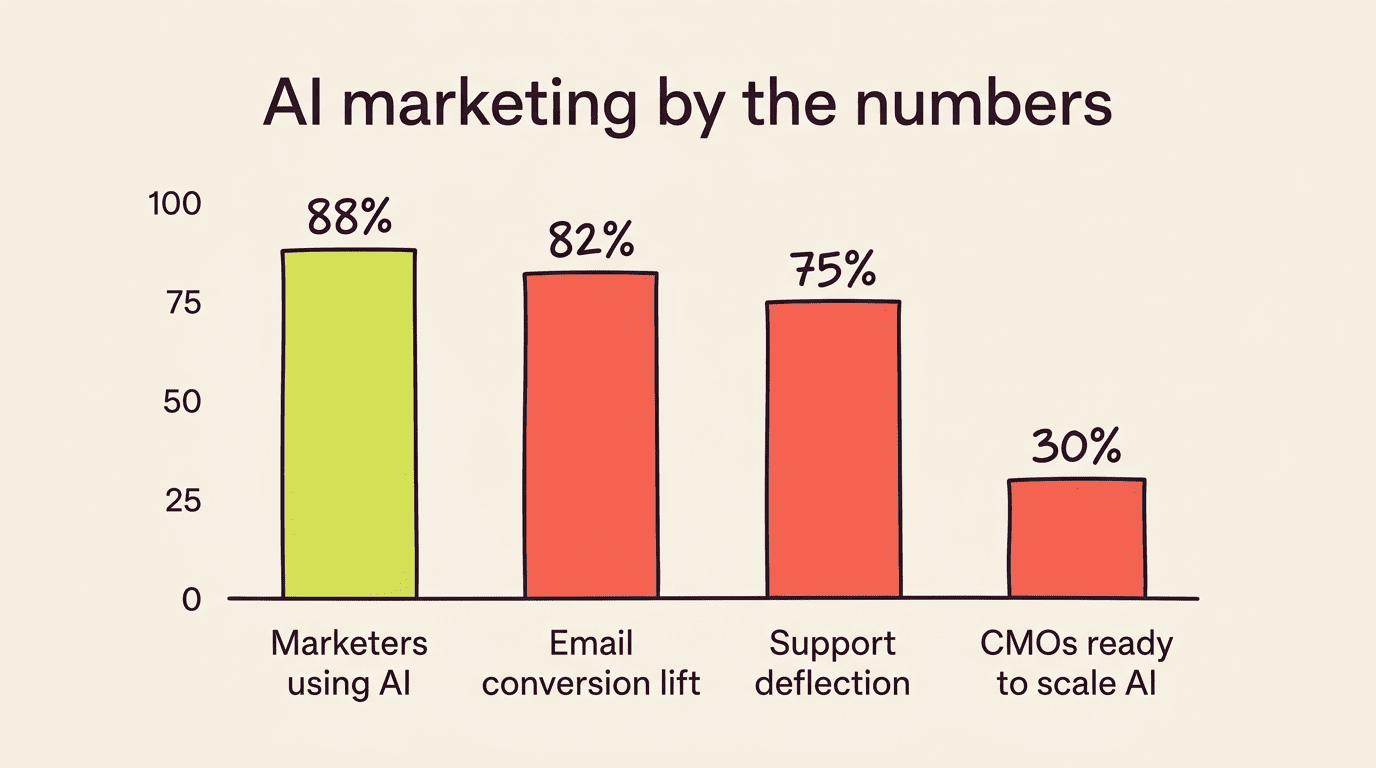
That answer matters because the martech landscape hit 15,384 tools in 2025, according to chiefmartec’s 2025 marketing technology landscape, yet only 30% of CMOs say their organization is ready to scale AI capabilities, per Gartner’s 2026 CMO Spend Survey. This guide walks through the layers of an AI marketing stack, the criteria for picking tools inside each layer, and how to avoid the tool bloat that leaves most teams with more software than they can explain.

What Is an AI Marketing Stack (and Its Layers)
An AI marketing stack is not a single platform — it’s a set of connected layers that together cover the full loop of demand creation, demand capture, and proof of impact. Each layer has one job, and a healthy stack has one or two well-integrated tools doing that job, not five doing it halfway.
The core layers
A high-performing stack is built around a handful of layers: a system of record (CRM/CDP) to hold customer data, content ops (briefs plus creation), measurement (analytics and reporting), personalization, and automation glue that connects everything. Think of it as one clean system that creates demand, captures demand, and proves impact — not a shelf of disconnected apps that each store their own slice of the customer.
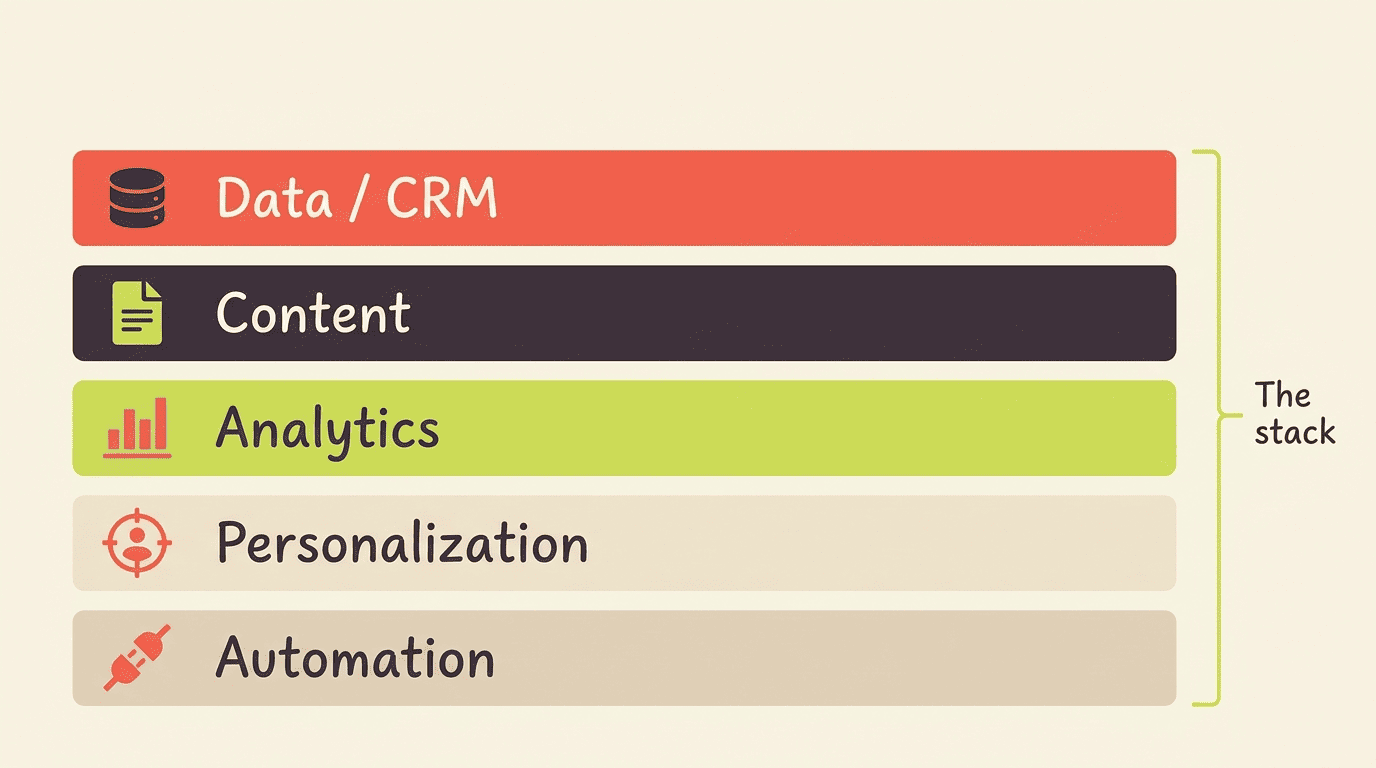
At its simplest, a stack needs to answer five questions:
- Where does customer data live, and is there one version of it?
- Who or what creates and edits marketing content?
- How is performance measured, and by whom?
- How is the message tailored per segment or individual?
- What connects the other layers so data moves without manual re-entry?
Why the stack matters now
The martech sector reached 15,384 distinct solutions in 2025 — a hundredfold increase since 2011 — spread across 49 categories, per chiefmartec’s marketing technology landscape. Stacks of 25 to 60-plus products are common inside marketing teams, yet pipeline stays flat and attribution stays murky because none of those tools share the same data. Only 30% of CMOs report their organization is ready to scale AI capabilities, per Gartner’s 2026 CMO Spend Survey, which is exactly why picking tools deliberately — rather than accumulating them — has become a competitive edge rather than a nice-to-have.
| Layer | Job it does | Typical output |
|---|---|---|
| Data / CRM / CDP | Stores and unifies customer records | Single customer view |
| Content ops | Drafts, briefs, and edits copy | Blog posts, ads, emails |
| Analytics / reporting | Measures what worked | Dashboards, attribution |
| Personalization | Tailors messages to segments | Dynamic content, offers |
| Automation glue | Connects the other layers | Triggered workflows |
How to Choose the Right AI Tools: 5 Criteria
Choosing tools well is less about features and more about discipline — knowing what problem you’re solving before you look at a demo, then scoring every candidate against the same short list of criteria.
Start with the problem, not the tool. Flip the question from «what tool should I get?» to «what am I trying to solve?» Map every tool you already own against your real bottlenecks; you’ll usually find gaps worth filling and several tools doing the same job that one could replace. Buying by job-to-be-done, not by category, is non-negotiable if you want the stack to stay lean.
Score every candidate on cost. Include per-seat pricing and usage-based fees, not just the sticker price on the pricing page — a $20/month tool for one seat becomes a very different number across a 12-person team.
Check integration before adoption. A tool that can’t pull or push data to your CRM creates a new silo instead of closing one. Prioritize tools with embedded, native AI over bolt-on add-ons that don’t share data with the rest of the stack.
Test scalability early. A tool that works for a five-person team can choke on approval workflows, permissions, or volume once ten more people touch it.
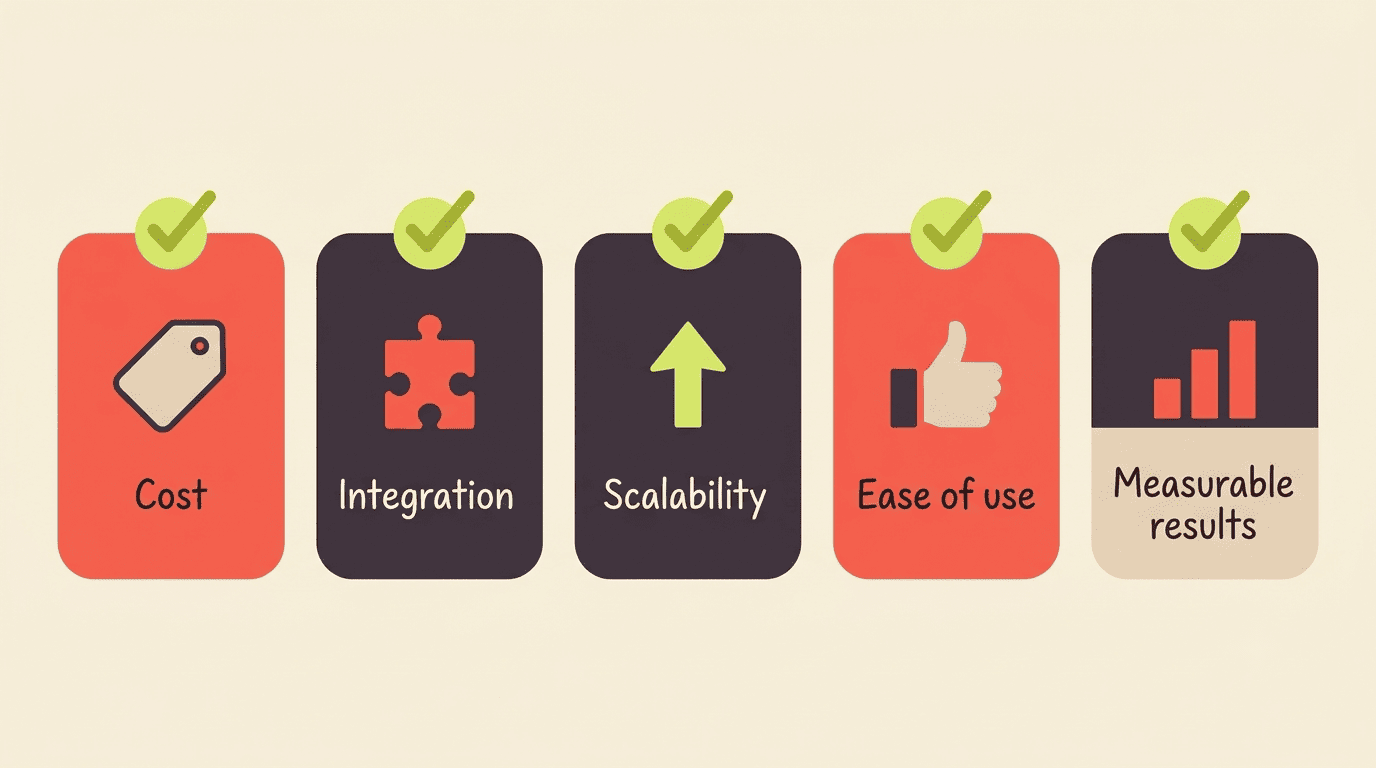
Weigh ease of use against measurable results. A tool nobody adopts is dead weight regardless of its feature list; a tool that’s easy to use but produces no measurable lift is just an expensive habit.
As Ann Handley, Chief Content Officer at MarketingProfs, put it when describing how marketers should treat new technology:
Technology has transformed marketing in so many amazing ways, but it doesn’t do much on its own. As much as I love technology and data, I value people and empathy more. And it turns out that the latter is really what will revolutionize your storytelling.
Ann Handley, Chief Content Officer, MarketingProfs
That’s the same test to apply to any AI tool under evaluation: does it amplify the people and judgment already on your team, or does it just add another login to remember.
Build a Lean Stack, Layer by Layer
Once the criteria are clear, the next step is picking one or two tools per layer instead of one per shiny new category that shows up in a newsletter. This is where AI for marketers becomes less about the tools themselves and more about how cleanly they fit together into one working system.
One tool per job
Pick two or three integrated tools that solve real bottlenecks rather than one per shiny category. A practical lean layout looks like this: an LLM assistant (ChatGPT or Claude, roughly $20/month) for drafting and analysis; a CRM and automation platform (HubSpot) as the system of record; analytics (GA4) for measurement; and a connector (Zapier, with more than 30,000 available actions) as the automation glue between everything else.
Match tools to layers
Each layer’s job points to a short list of candidate tools:
- Data/CRM — HubSpot or whatever CRM/CDP already holds customer records
- Content — an LLM plus an SEO optimizer such as SurferSEO or Clearscope
- Analytics — GA4 plus a reporting layer
- Personalization — your ESP or CDP
- Automation — Zapier or Make
Add specialized tools only when a layer’s job is genuinely unmet — not because a competitor uses one.

The teams that get the most value from AI are the ones that treat these layers as a system rather than a shopping list, feeding the same customer data through content, personalization, and measurement instead of re-entering it in each tool. Zapier’s own documentation is a useful gut-check here: its connector alone now exposes more than 30,000 actions across roughly 9,000 apps, which is exactly the kind of sprawl a lean stack is meant to tame rather than add to.
Embedded vs. Bolt-On AI (and Integration)
Where the AI actually lives inside your stack — native to a platform you already use, or bolted on as a separate app — changes how much value you get from it.
Why integration wins
Embedded AI lives inside the platform and acts directly on its data; bolt-on AI is a separate tool you paste results between, copying context back and forth by hand. Embedded AI reduces copy-paste work, keeps context intact across a workflow, and compounds in value over time — which is why integration and native AI beat standalone novelty almost every time.
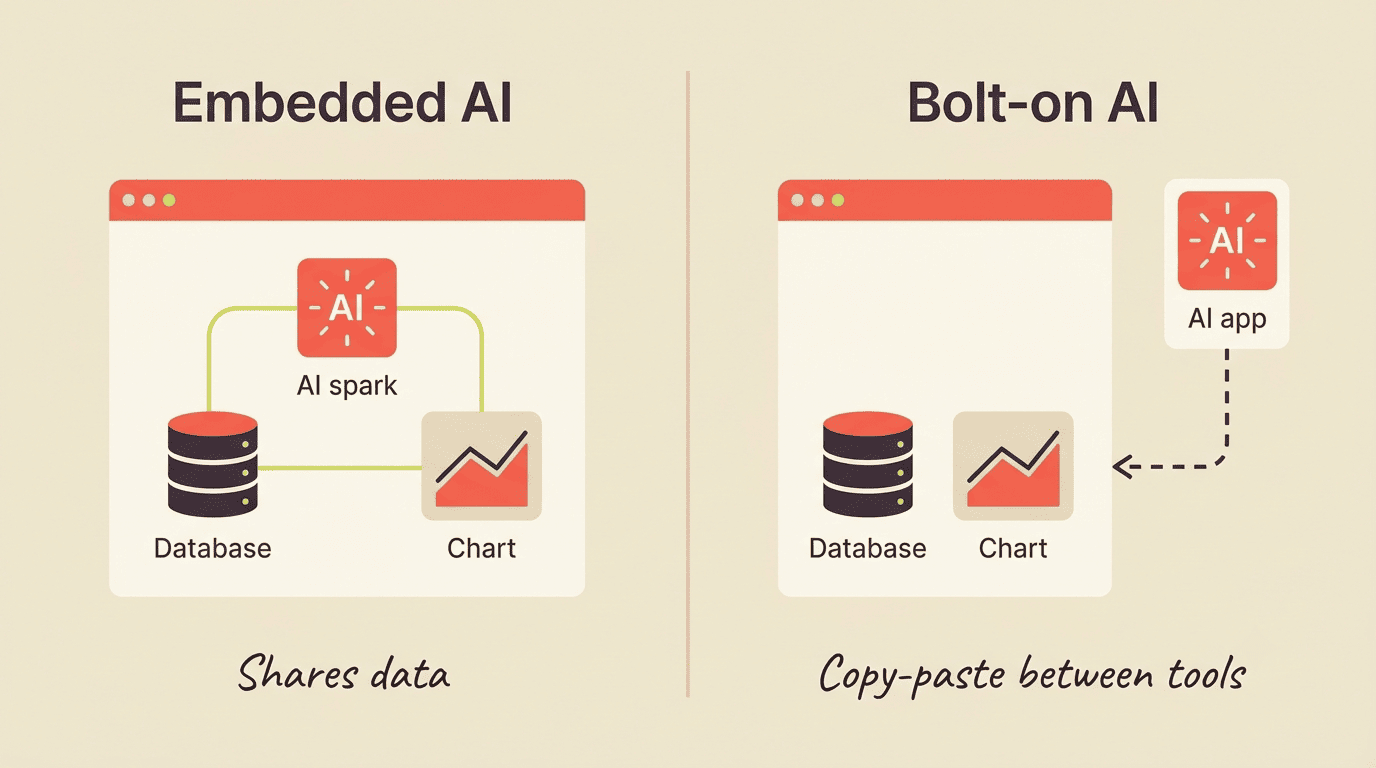
The practical differences show up fast once a team is using a tool daily:
- Embedded AI reads and writes to the same customer record everyone else works from
- Bolt-on AI usually requires exporting or copying data in and results back out
- Embedded AI inherits the parent platform’s permissions and audit trail
- Bolt-on AI needs its own login, its own access review, and its own security check
Agentic AI — tools that plan and act across multiple steps on their own — is emerging but still early: only 8% of CMOs report running campaigns where multiple AI agents operate autonomously, per Gartner’s 2026 CMO Spend Survey, while most still use generative AI as an assistant for individual tasks.
Avoiding Tool Bloat: Pilot and Measure
Even a well-chosen tool can turn into bloat if nobody ever checks whether it’s still earning its seat in the stack. A short, disciplined pilot process is what keeps that from happening.
Run a 30-day pilot
Here’s a simple process for testing any new AI tool before it becomes a permanent line item:
- Define one success metric before you sign up — time saved, conversion lift, or revenue influenced.
- Assign one owner responsible for using the tool daily for 30 days.
- Track the metric weekly, not just at the end of the trial.
- Compare the result against what the tool costs per month, including every seat.
- Decide at day 30: keep, renegotiate, or cancel — no automatic renewals without a review.
- Document the decision so the next person doesn’t repeat the evaluation from scratch.
Before you keep any tool, run a 30-day pilot with a clear success metric. If it doesn’t move revenue or reclaim meaningful time, don’t keep it. This one habit is what separates a lean, revenue-driven stack from a 40-tool graveyard nobody can explain. Comparing the best AI tools for marketing on paper only gets you so far; a 30-day pilot is how you find out which ones actually earn a place in your stack.
Prove impact with numbers
Track the outcomes that justify keeping the tool: reporting time, which AI commonly cuts by 60-80%; conversion lift, where HubSpot’s AI-personalization case study saw email conversions rise 82%; and hours reclaimed, as in 1Password’s case study on its support deflection, which reports 16,000 support hours saved and a 75% deflection rate on incoming support inquiries within six months of adopting conversational AI. Multiple 2026 surveys now put daily-or-weekly AI use among marketers at roughly 88%, so the real question isn’t whether to adopt AI — it’s which few tools earn a permanent place in the stack.
| Metric | Typical impact |
|---|---|
| Reporting time | Cut 60-80% |
| Email conversion (case study) | +82% |
| Support hours reclaimed (1Password) | 16,000 hours, 75% ticket deflection |
| Marketers using AI daily/weekly | ~88% |
FAQ
Related guides: AI for paid ads and campaign optimization and AI content creation and copywriting.