
AI for Marketers: How to Build AI Workflows and Automation That Actually Run
An AI marketing workflow is a repeatable sequence of marketing steps where AI handles the execution and you keep the strategy. Working with AI for marketers tools means picking your most time-consuming task first, mapping its steps, and handing the most repetitive one to an AI tool rather than trying to automate everything at once.
Organizations automating more of their marketing are twice as likely to see strong ROI from AI, according to McKinsey’s research on agentic marketing workflows, and generative AI now saves marketers roughly three hours per piece of content. This guide walks through the framework step by step, with example workflows and a realistic tool stack.

What Is an AI Marketing Workflow (and How It Differs from Old-School Automation)
Marketing teams have run automation for two decades, but AI marketing automation behaves differently from the rule-based systems most CRMs shipped with. The distinction matters because it changes what you build first and how much oversight each step needs.
Traditional automation vs AI automation
Traditional marketing automation follows pre-built static workflows: if a contact clicks X, send email Y, wait three days, send email Z. The logic never changes unless a human edits it. AI marketing automation instead analyzes behavioral patterns across your entire database and adjusts campaigns in real time, optimizing send times, subject lines, and content based on what is actually working right now rather than what worked when the workflow was built.
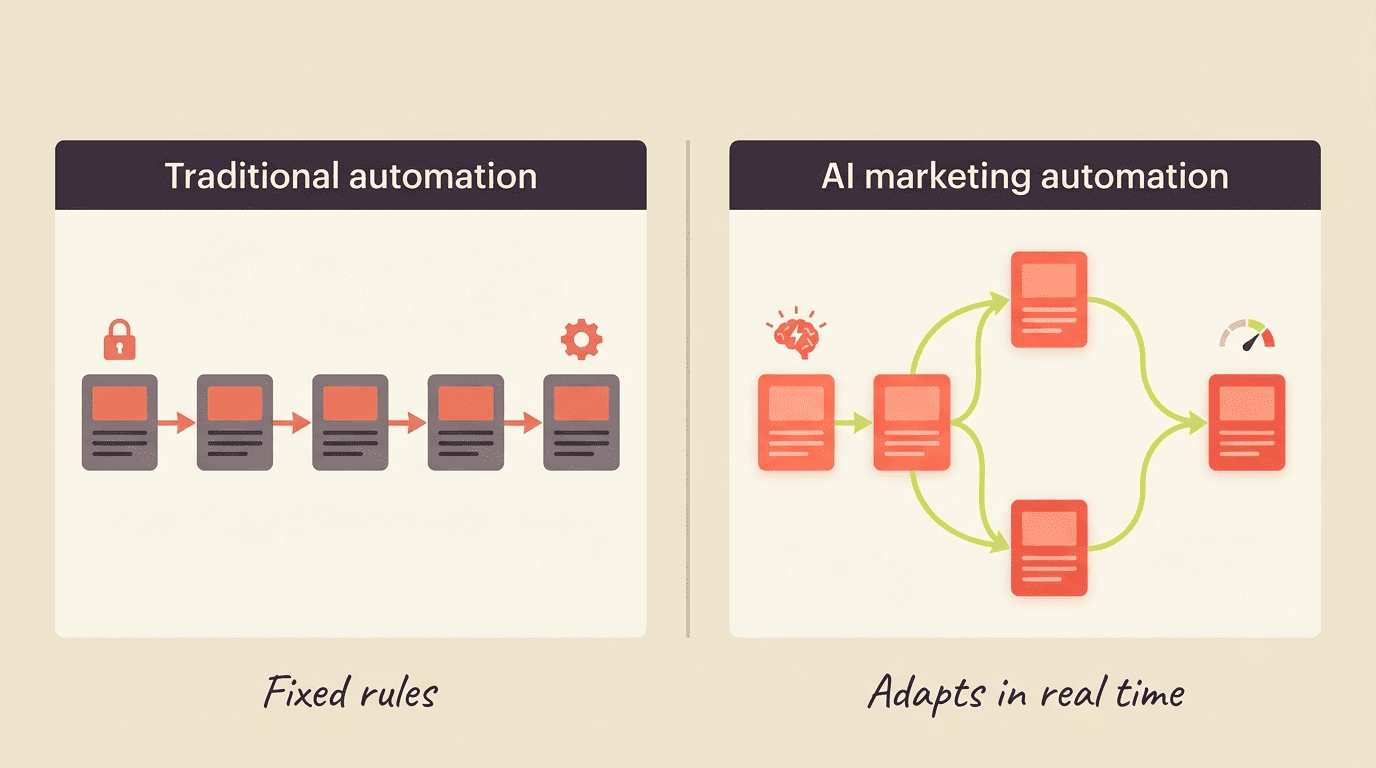
Static drip campaigns send the same content in the same order regardless of engagement. An AI-powered marketing workflow recognizes that a lead opened three emails but never clicked, and adapts the next touch — different subject line, different offer, different channel — without a marketer rewriting the sequence.
| Traditional automation | AI marketing automation |
|---|---|
| Fixed if-then rules | Behavior analyzed continuously |
| Same sequence for everyone | Adapts per contact in real time |
| Manual updates required | Self-adjusts based on outcomes |
| Best for simple triggers | Best for personalization at scale |
Where agentic AI fits
Agentic AI adds AI agents that can plan and act across multiple steps, not just fire a single message when a trigger condition is met. McKinsey notes agentic workflows can accelerate campaign execution 10-15x and content creation roughly 4x, yet fewer than 10% of CMOs have actually deployed them while close to 90% are still testing — which leaves an early-mover window for teams willing to build now.
An agent handling a marketing workflow typically covers three jobs at once:
- Brainstorming and vetting campaign ideas before a human picks a direction
- Drafting content, then running rapid pretests of the creative concepts
- Checking brand, legal, and compliance requirements before anything ships
That combination is why agentic pilots move faster than a single automation trigger ever could — the agent is coordinating steps a human would otherwise hand off between tools.
The 5-Step Framework to Build Your First AI Workflow
Most marketers overbuild their first AI marketing workflow, trying to automate an entire campaign end to end. The teams that actually ship working automation start narrower, replace one step, and expand from there.
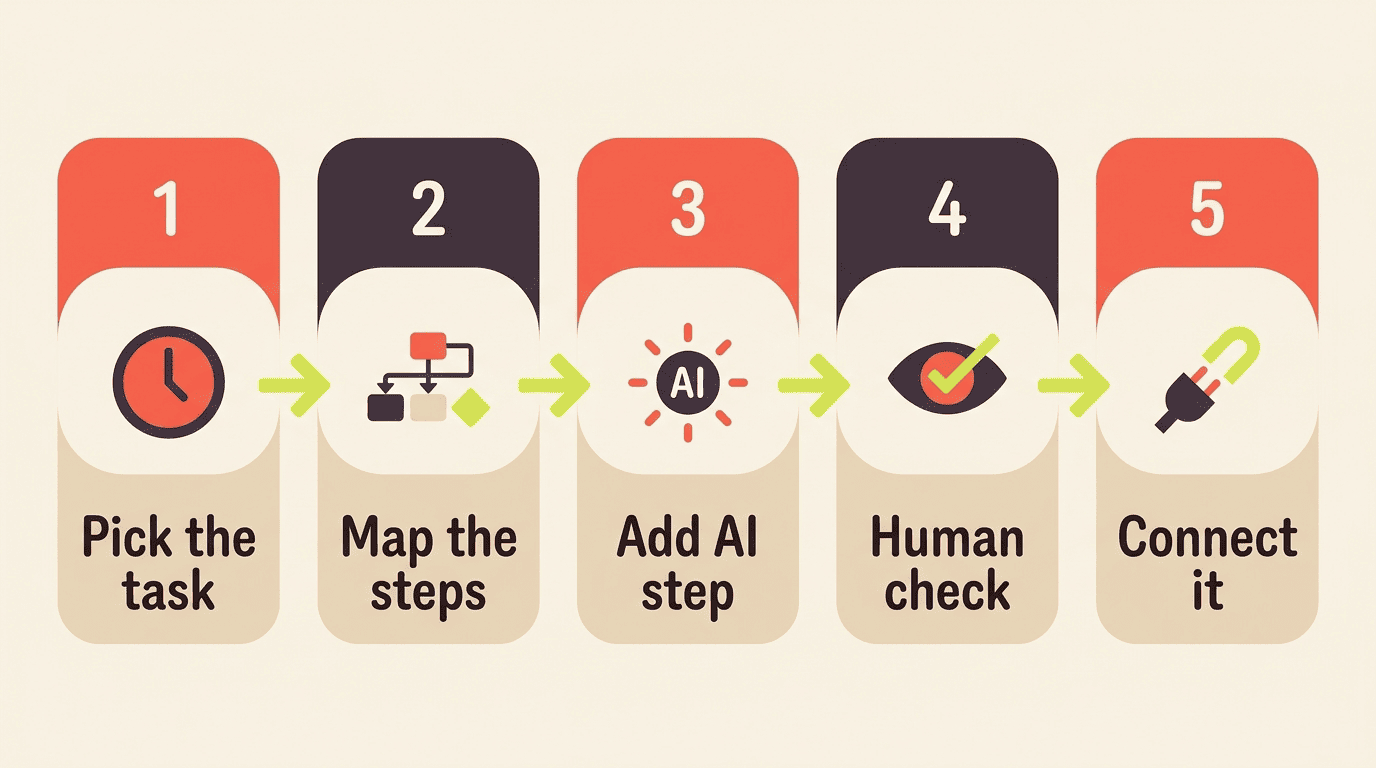
- Pick the highest-cost task. Choose the task eating the most hours on your team. Surveys on marketing automation adoption consistently put email as the most commonly automated channel, with roughly 60-65% of marketers automating it, but yours might be content drafting or reporting instead.
- Map every step. Write out the current process end to end, including the manual handoffs nobody thinks about until they’re written down.
- Replace the most repetitive step with AI. Swap in an AI tool for that single step before automating the whole chain — small, reliable wins beat one giant fragile automation.
- Add a human checkpoint. Keep a review gate wherever brand voice or judgment matters.
- Connect and orchestrate. Wire the steps together with a connector tool like Zapier, which lists over 9,000 app integrations, or your existing automation platform, so the workflow runs without manual intervention.
Step 1 in practice — picking the task
Content drafting is a common first candidate because the time savings are measurable: writing time drops from roughly 3-4 hours to 1.5-2 hours per piece once AI handles the first draft. Reporting is another strong candidate, since pulling numbers into a deck rarely requires judgment, just consistency.
If two tasks look equally time-consuming, pick the one with the most volume. A task you repeat 20 times a week compounds the time savings far faster than one you do twice a month, even if the per-instance savings looks smaller on paper.
Step 3 in practice — the single-step swap
Resist wiring five tools together on day one. Automate the drafting step only, run it for two weeks, then look at Step 5 (orchestration) once that single step is reliable. This is where most AI workflow automation projects either succeed or quietly get abandoned.
Teams that skip this step tend to automate the whole workflow before trusting any part of it, then abandon the project the first time the AI output needs heavy editing. One working step you actually keep beats five automated steps you turn off after a month.
6 AI Marketing Workflow Examples You Can Build This Week
Seeing a working example makes the framework concrete. Each of these six workflows starts from the same five-step process and can be running within a week, using tools most teams already have access to.
1. AI email personalization & predictive send
AI adapts the next email based on behavior instead of following a fixed drip sequence. Predictive send-time optimization lifted click-through rate by roughly 17% in one ActiveCampaign case example, simply by sending each contact’s email when they’re statistically most likely to open it.
2. Lead scoring & routing
AI analyzes hundreds of variables — page visits, email engagement, firmographic data — to rank purchase intent and route hot leads to sales automatically. Companies that adopt systematic lead scoring have reported qualified-lead increases as high as 451% and lead-generation ROI gains of 77% compared to teams that skip scoring and triage leads manually, though these are upper-range figures from vendor case studies rather than a universal benchmark.
3. Content drafting & repurposing
Draft, summarize, and repurpose long-form content into social posts and email copy with tools like ChatGPT or Claude. Generative AI saves roughly three hours per content piece and about 2.5 hours per day across a typical content workload, per HubSpot’s State of Generative AI research.
4. Social scheduling & response suggestions
AI picks optimal posting times based on audience behavior data and drafts reply suggestions for comments, cutting the time between a comment landing and a response going out.
5. Abandoned cart & re-engagement
Behavior-triggered recovery and win-back journeys adapt messaging, timing, and channel automatically instead of sending the same generic «you left something in your cart» email to everyone.
6. Multi-channel orchestration
Multi-channel orchestration coordinates email, SMS, and ads so channels cooperate instead of competing. The system knows a contact just made a purchase or clicked an ad before choosing the next message, avoiding the awkward experience of an ad chasing someone who already bought.
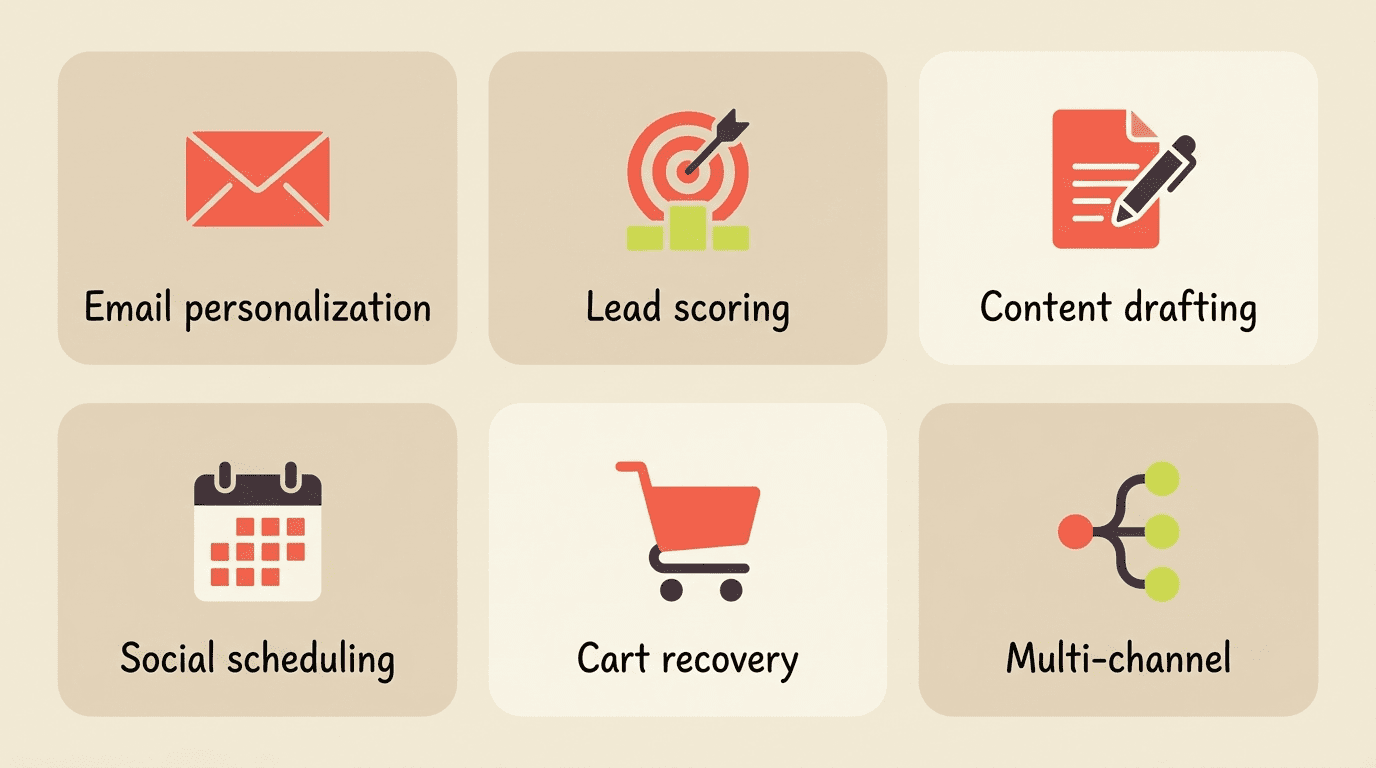
Working with AI marketing tools across these six workflows rarely requires a large budget — most start with the stack already described in the framework above.
| Workflow | What AI does | Reported time/lift |
|---|---|---|
| Email personalization | Adapts send time & content per contact | +17% CTR |
| Lead scoring & routing | Ranks intent, routes hot leads | +451% qualified leads |
| Content drafting | Drafts & repurposes content | ~3 hrs saved/piece |
| Abandoned cart recovery | Adapts message, timing, channel | Higher recovery rate |
| Multi-channel orchestration | Coordinates email/SMS/ads | Fewer redundant sends |
Choosing Your AI Workflow Stack
The tool question trips up more marketers than the framework itself. You don’t need an enterprise martech budget to start — you need three layers that talk to each other, and a plan for adding complexity slowly.
An LLM assistant handles drafting and analysis. ChatGPT or Claude, at roughly $20/month each, produces first drafts, summaries, and quick data reads that used to take a person an hour.
An automation platform runs the actual campaign logic. HubSpot or ActiveCampaign fires the triggers, sequences, and sends once the AI layer has produced the content or the lead score.
A connector glues the tools together. Zapier moves output from one tool into another without you copying and pasting between browser tabs. A lean solo stack combining all three layers can start near $40 a month.

Begin with one LLM and one automation platform. Add AI agents and full orchestration only once a single workflow reliably runs on its own for a few weeks — bolting on agentic complexity before the base workflow is stable is the most common reason these projects stall.
Keep the Human in the Loop
Not every step should be handed to AI, and the workflows that fail fastest are usually the ones where a marketer automated a judgment call instead of a repeatable process.
The automate-vs-keep rule
Ask two questions before you automate anything:
- Does this task apply the same process to a defined input every time? If yes, it’s a candidate for AI.
- Does it need a judgment call using context only a person has — brand risk, a sensitive complaint, an exception to policy? If yes, keep it human.
AI handles execution; you own strategy and brand voice. As HubSpot co-founder and CTO Dharmesh Shah put it at INBOUND 2025:
AI isn’t here to replace us. It’s here to replace the parts of our work that don’t bring us joy.
Dharmesh Shah, HubSpot
Working through best AI tools for marketing with this rule in mind keeps automation from drifting into territory where it damages trust instead of building efficiency.
Guardrails
Before any AI marketing workflow runs unattended, put three guardrails in place:
- A review checkpoint before anything customer-facing ships without a human look
- Compliance checks against regulations like GDPR, CAN-SPAM, and CCPA
- Regular output monitoring so automation stays on-brand as your data and audience shift over time
Skipping any one of these is how a well-intentioned automation ends up sending a discount code to a customer who already complained, or emailing a contact who opted out weeks ago.
Measuring ROI and Time Saved
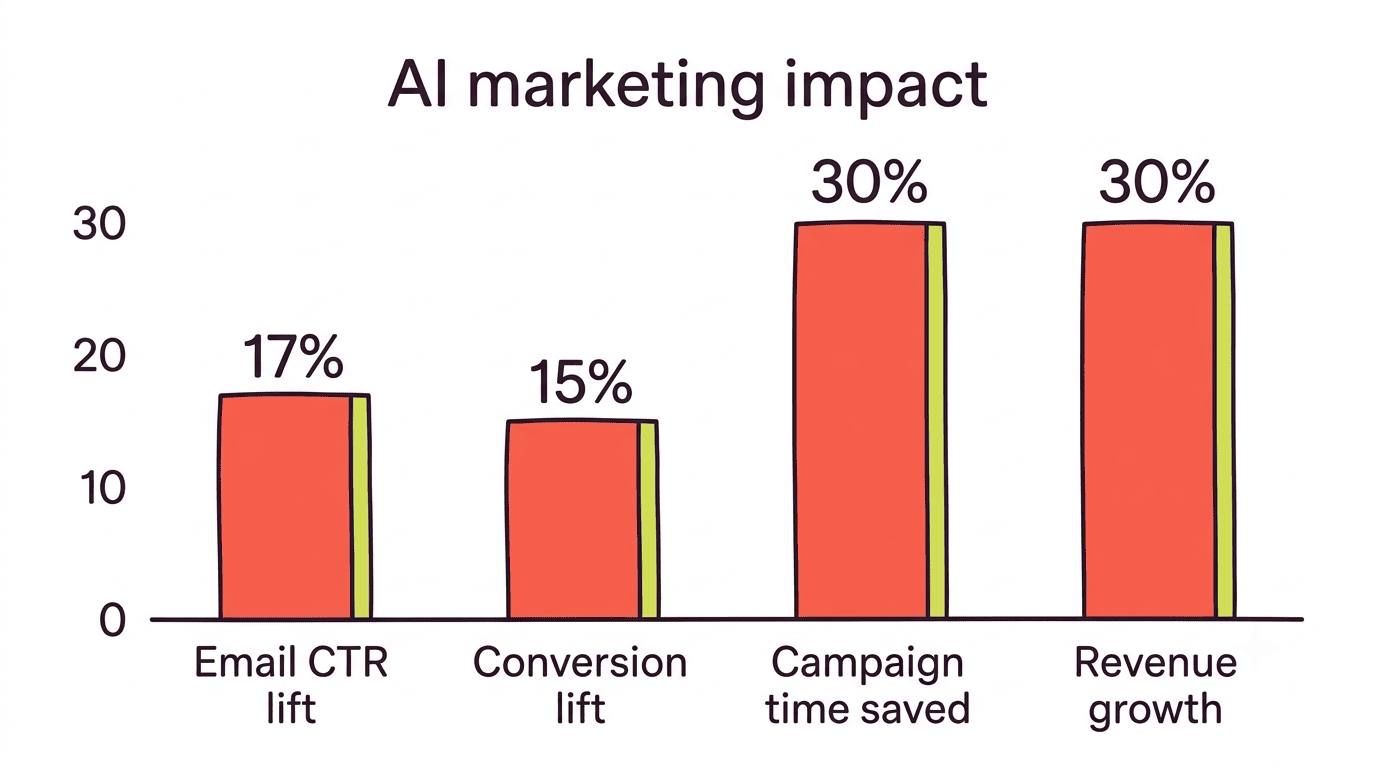
An AI marketing workflow that nobody measures is hard to defend at budget time. Track four numbers consistently: hours reclaimed per week, campaign-creation time, conversion lift, and revenue attributable to personalization.
- Hours reclaimed: 8-10 hours per week is a realistic range once a workflow is running smoothly
- Campaign-creation time: examples show roughly 30% reductions once drafting is automated
- Conversion lift: reported KPI examples show gains around 15% from better-timed, better-targeted messaging
- Revenue from personalization: hyper-personalized campaigns are linked to 10-30% of incremental revenue in reported cases
Companies automating more of their marketing are twice as likely to report strong AI ROI than teams that automate only a handful of isolated tasks, which is the strongest argument for expanding from one workflow to several once the first one proves out.
FAQ
Related guides: AI for social media marketing and choosing the right AI marketing tools.